
The SaaS Founder’s Playbook for Painless CRM Implementation
Most early-stage SaaS companies treat their CRM rollout as an administrative box to check. You select a vendor, enter a credit card, invite the sales team, and expect deal velocity to increase overnight.
Six months later, pipeline stages sit untouched, your reps run enterprise accounts out of private spreadsheets, and your executive team still forecasts renewals with educated guesswork.
A successful CRM implementation for SaaS startups is never a technical deployment problem. It is a human adoption problem. When you force an engineering-heavy database onto reps without operational guardrails, your revenue engine stalls.
This playbook outlines the exact framework to design, launch, and scale a CRM architecture that your revenue team will actually use
The Hidden Cost of Failed CRM Adoption
When early-stage SaaS teams run into software friction, leadership often assumes the tool is the problem. They migrate platforms, burn three months of runway, and reproduce the exact same inefficiencies.
The underlying issues stem from three recurring operational mistakes:
Over-engineering data validation too early: Requiring 20 mandatory fields to log a discovery call causes account executives to take conversations offline or enter dummy data to bypass prompts.
Siloing departments across tools: If marketing metrics live in an email platform, sales opportunities in a CRM, and product usage in an internal database, customer journeys fracture.
Underestimating ongoing CRM support: Software rollouts do not conclude on launch day. Without dedicated CRM support to clean duplicate contacts, triage user questions, and adjust broken automation logic, pipeline data decays rapidly.
A failed implementation drains engineering hours, inflates customer acquisition costs (CAC), and conceals churn indicators until accounts cancel unexpectedly.
Phase 1: Establish Your Minimum Viable Data Model
Before buying user seats or building automated sequences, map your end-to-end buyer journey on paper. Your database architecture should mirror how prospects buy, not how an executive builds reports.
Map the 4 Core Lifecycle Stages
Keep your structural stages lean. Every stage transition must require an objective, verifiable buyer action:
Lead / Inbound Capture: A user signs up for a trial, books a product demo, or requests pricing.
Opportunity / Evaluation: The prospect confirms budget, authority, need, and a strict timeline (BANT/MEDDIC criteria).
Customer / Onboarding: Contract signed, initial payment cleared, and technical setup initiated.
Renewal / Account Expansion: Product usage metrics hit pre-defined milestones, or an enterprise contract approaches its 90-day renewal window.
Apply the “Rule of Five” to Pipeline Stages
Restrict mandatory data collection to actionable inputs. If an executive or team member cannot explain how a data point changes a revenue decision, delete the field.
| Pipeline Stage | Verification Trigger | Required Input Fields |
| Discovery Scheduled | Prospect books a meeting link | Lead Source, Company Size, ICP Fit (Yes/No) |
| Demo Completed | Technical discovery call held | Primary Pain Point, Tech Stack, Confirmed Next Step Date |
| Proposal Delivered | Quote or formal agreement sent | Target Close Date, Contract ARR, Economic Buyer Name |
| Contract Signed | Electronic signature completed | Billing Contact, Payment Terms, Customer Handover Notes |
Phase 2: Eliminate Friction with Background Automation
The fastest way to destroy CRM adoption is turning quota-carrying reps into manual data entry clerks. Configure native integrations and workflow automations to handle administrative upkeep in the background.
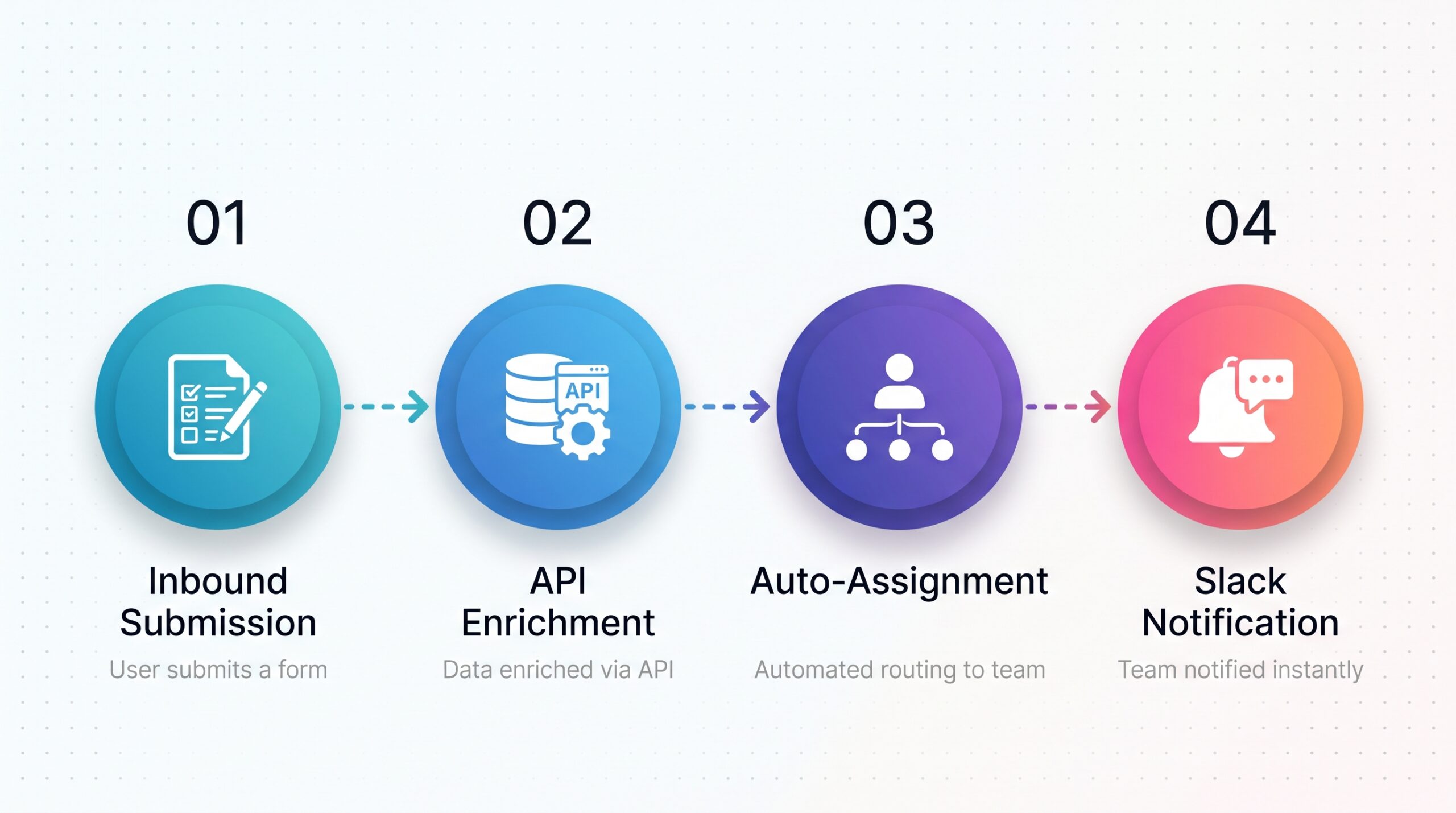
Essential Automations to Deploy on Day One
Native email and calendar syncing: Integrate Google Workspace or Microsoft 365 natively. Every meeting, email thread, and reschedule must log to the contact record automatically.
Automated lead enrichment: Use enrichment APIs to append employee count, industry classifications, and corporate domains automatically from an email address.
Activity-based pipeline updates: Move deals out of initial pipeline stages automatically once a discovery call is logged, eliminating manual stage dragging.
Slack or Teams notifications: Send high-intent lead alerts and contract signature confirmations directly into public deal rooms where reps already spend their time.
Phase 3: Rollout Strategy and Change Management
A successful rollout depends on clear operational documentation and management alignment rather than vendor training videos.
Create 1-Page Operational Cheat Sheets
Do not send reps to read product documentation. Build 1-page operational runbooks stored in your internal knowledge base:
Standardized naming conventions for accounts and opportunities (e.g.,
[Company Name] - [Product Tier] - [Close Month/Year]).Clear qualification criteria explaining when a lead officially converts into an active pipeline opportunity.
Handoff protocols detailing exactly what notes Customer Success needs before onboarding starts.
Establish the Golden Rule of Pipeline Reviews
Enforce an inflexible operating rule across your management team: If a deal is not documented in the CRM, it does not exist.
Conduct every 1:1 meeting, forecasting call, and compensation review directly inside live CRM dashboard views. If a rep requests guidance or credits on a deal that only exists in their notes app, pause the conversation until the record is created. Consistent leadership accountability builds daily user habits faster than any software feature.
Phase 4: Long-Term Governance and Iteration
Treat your CRM as an evolving operational asset rather than a static piece of software. Assign one internal stakeholder—a RevOps specialist, sales operations lead, or founding executive—to own system hygiene.
Weekly friction audits (First 30 Days): Host a recurring 15-minute sync with daily users. Identify unnecessary validation fields, broken notification rules, or slow dashboard loading times.
Monthly database hygiene: Run automated deduplication sweeps across domains, purge unengaged personal email signups, and clear abandoned draft deals.
Quarterly funnel conversion reviews: Analyze win rates across specific pipeline stages. If 60% of stalled deals linger in “Proposal Delivered,” re-evaluate your pricing structure, contract templates, or qualification criteria.
Scalable Revenue Demands Simple Systems
A successful CRM implementation for SaaS startups is not measured by the number of custom fields you build, but by the consistency with which your team uses the platform. Strip away administrative bloat, automate repetitive data entry, and structure your pipelines around tangible buyer decisions.
When your CRM removes friction instead of creating it, reliable pipeline forecasting and steady growth follow naturally.
What is the biggest operational hurdle your team faces with your current CRM setup? Share your experience in the comments, or subscribe to our newsletter for tactical playbooks on building predictable B2B revenue engines.
Frequently Asked Questions About CRM Implementation for SaaS Startups
1. What is CRM implementation for a SaaS startup?
CRM implementation is the process of configuring a customer relationship management (CRM) system to support a SaaS company’s sales processes, customer data, workflows, reporting, and business goals. It includes defining pipeline stages, organizing contact and company records, integrating existing tools, automating repetitive tasks, and training team members to use the system effectively.
A successful CRM implementation aligns technology with the way a business operates, helping teams improve visibility, maintain consistent data, and manage customer relationships as the company grows.
2. How long does CRM implementation take for a SaaS company?
The timeline for CRM implementation depends on the company’s size, data quality, workflow complexity, integration requirements, and migration needs. A straightforward implementation with a clearly defined sales process may take considerably less time than a complex rollout involving multiple departments, legacy systems, and extensive customization.
To avoid unnecessary delays, SaaS founders should define the initial scope, prioritize essential features, prepare their data before migration, and roll out the CRM in manageable phases.
3. Why do CRM implementations fail?
CRM implementations often struggle because of unclear business requirements, overly complicated workflows, poor data quality, insufficient user training, and limited employee adoption. In some cases, companies configure too many features before establishing the processes those features are supposed to support.
To improve the likelihood of success, businesses should start with a simple data model, define clear pipeline stages, automate repetitive administrative tasks, and assign ownership for data quality and ongoing system maintenance.
4. What should a SaaS startup configure first in its CRM?
A SaaS startup should begin by mapping its customer journey and defining the information needed to manage prospects, opportunities, and customer relationships. The initial setup should include contact and company properties, lifecycle stages, a clearly defined sales pipeline, essential reporting, and the integrations required for daily operations.
Start with the minimum viable data model rather than collecting every possible data point. Once the team consistently uses the core system, additional properties, automations, and reports can be introduced as business needs evolve.
5. How can SaaS companies improve CRM adoption among employees?
SaaS companies can improve CRM adoption by making the system easy to use and ensuring that it supports employees’ everyday responsibilities. This includes reducing unnecessary data entry, automating repetitive tasks, providing role-specific training, documenting standard processes, and establishing clear expectations for updating records.
Managers also play an important role by using CRM data during pipeline reviews, forecasting, and coaching sessions. When the CRM becomes part of how the team works rather than an additional administrative burden, employees have stronger reasons to keep it updated.
6. What CRM workflows should SaaS startups automate first?
SaaS startups should prioritize workflows that reduce repetitive work, prevent missed follow-ups, and improve the consistency of their sales processes. Common starting points include lead assignment, task creation after important sales activities, follow-up reminders, lifecycle-stage updates, internal notifications, and customer handoff processes.
Before automating a workflow, define the trigger, required conditions, intended action, and responsible owner. Start with a small number of high-value automations, monitor their performance, and expand them as the business’s processes mature.
7. How can SaaS companies maintain CRM data quality over time?
Maintaining CRM data quality requires clear data-entry standards, consistent ownership, duplicate management, validation rules where appropriate, and regular data reviews. Companies should identify which fields are essential, establish rules for keeping records current, and monitor incomplete or inconsistent information.
Data quality should be treated as an ongoing operational responsibility rather than a one-time cleanup project. Regular reviews help ensure that CRM reports, sales forecasts, and customer handoffs remain useful as the business grows.
8. Does a SaaS startup need ongoing CRM support after implementation?
Yes. CRM requirements change as a SaaS company expands its team, introduces new products, enters new markets, or adjusts its sales processes. Ongoing CRM support helps businesses troubleshoot workflows, maintain data quality, refine automation, improve reporting, and adapt the system to changing operational needs.
Working with an experienced CRM implementation and support partner can help businesses identify improvement opportunities and keep their systems aligned with their goals. The level of support required will depend on the company’s internal expertise, system complexity, and growth plans.
9. How can HubSpot help SaaS startups streamline CRM implementation?
HubSpot provides CRM capabilities that help SaaS businesses organize customer records, manage sales pipelines, automate workflows, track customer interactions, and report on sales activities. Depending on the HubSpot products and subscription tiers selected, companies can configure tools to support their sales, marketing, and customer service operations.
The most effective setup depends on the company’s processes and requirements. SaaS startups should identify their priorities before selecting features, configuring automations, or investing in additional tools.
10. Should a SaaS startup implement its CRM in phases?
A phased implementation can help SaaS startups introduce a CRM without overwhelming employees or creating unnecessary complexity. The first phase should focus on essential data, pipeline stages, core workflows, and basic reporting. Later phases can introduce more advanced automation, integrations, customization, and analytics based on actual business needs.
After each phase, collect feedback, review adoption, resolve process gaps, and confirm that the system is delivering value before expanding its functionality. This approach makes CRM implementation more manageable and allows the system to evolve alongside the business.
Ready to eliminate pipeline leaks and get your CRM adoption right?
Implementing a new CRM shouldn’t cost you months of lost productivity or frustrated reps. Book a free 30-minute RevOps strategy session with our team to map out your minimum viable data model, automate tedious hygiene tasks, and launch a system your revenue team will actually use.