
CRM Dashboard Setup Factors for Scaling Sales Teams
In fast-growing B2B SaaS companies, data visibility is often the first casualty of scale. When a sales team grows from 5 reps to 50, the native executive dashboards that once provided clarity suddenly produce conflicting figures, skewed forecasts, and widespread confusion.
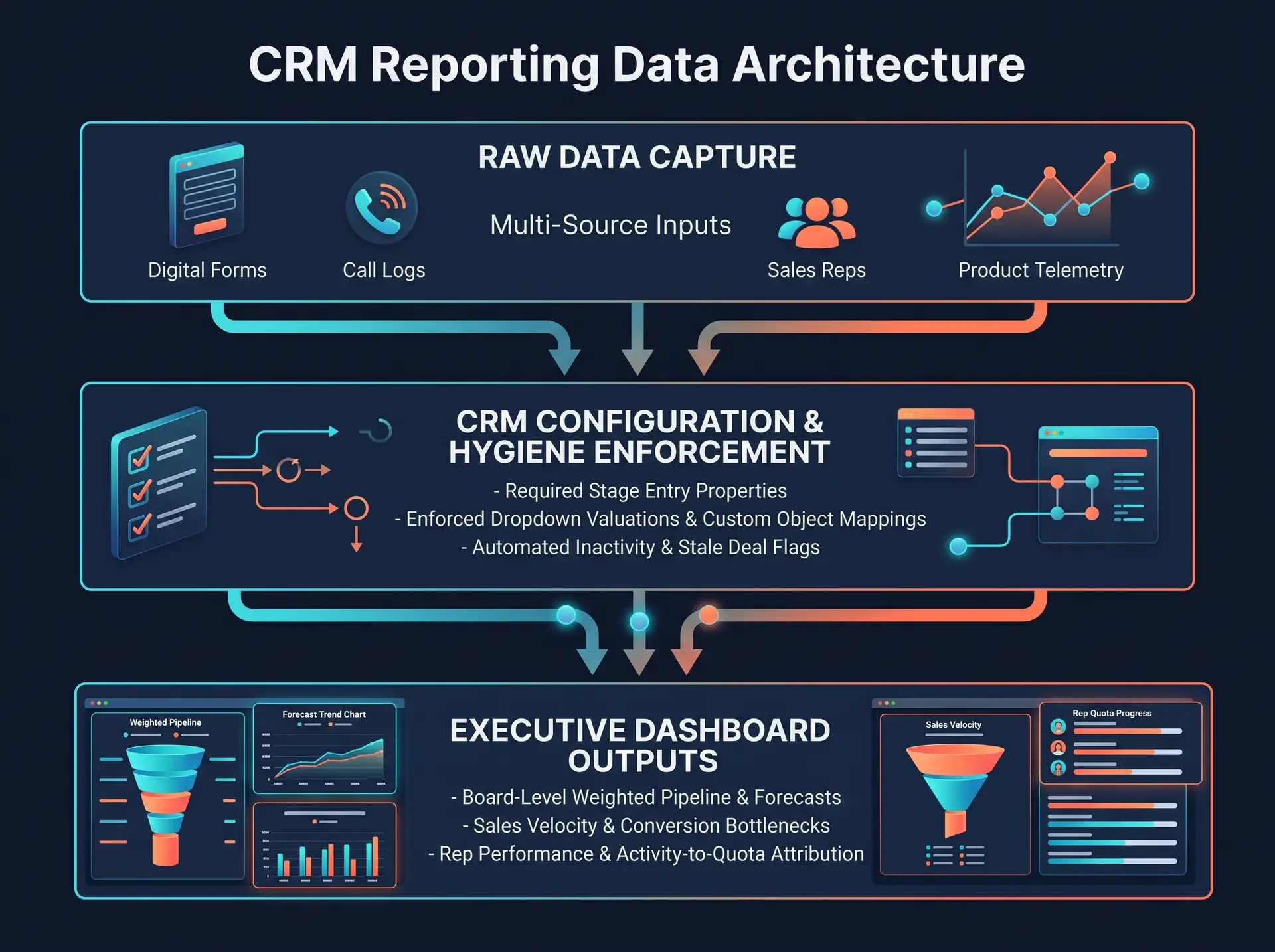
The underlying issue is rarely the CRM reporting engine itself. It is structural. Bad data architecture, inconsistent deal hygiene, missing custom properties, and unaligned pipeline stages lead directly to untrustworthy dashboards.
When leadership cannot trust their reports, decisions stall, sales cycles stretch, and revenue predictability drops.
Building actionable, executive-ready CRM reporting requires looking past surface-level widget layouts. Here are the foundational configuration factors that growth leaders, RevOps managers, and sales directors must address to engineer accurate dashboards and complete sales visibility.
1. Establishing Standardized Pipeline Data Architecture
A CRM dashboard is only as accurate as the underlying data model feeding it. When sales reps interpret pipeline stages differently, metrics like Conversion Rate by Stage or Average Sales Velocity become meaningless.
Core Configuration Requirements:
Strict Stage Entry Criteria: Define objective, mandatory requirements before a deal can advance (e.g., a deal cannot move to “Demo Completed” without an attached meeting log and verified decision-maker property).
Standardized Closed-Lost Reasons: Replace open-text fields with enforced single-select dropdown properties (e.g., Price, Missing Feature, Competitor, No Decision) to enable meaningful loss analysis.
Normalized Currency & Multi-Market Handling: Ensure automated exchange rate conversions are active for multi-region teams, keeping top-line ARR/MRR metrics clean across global dashboards.
2. Segregating Dashboards by Operational Role
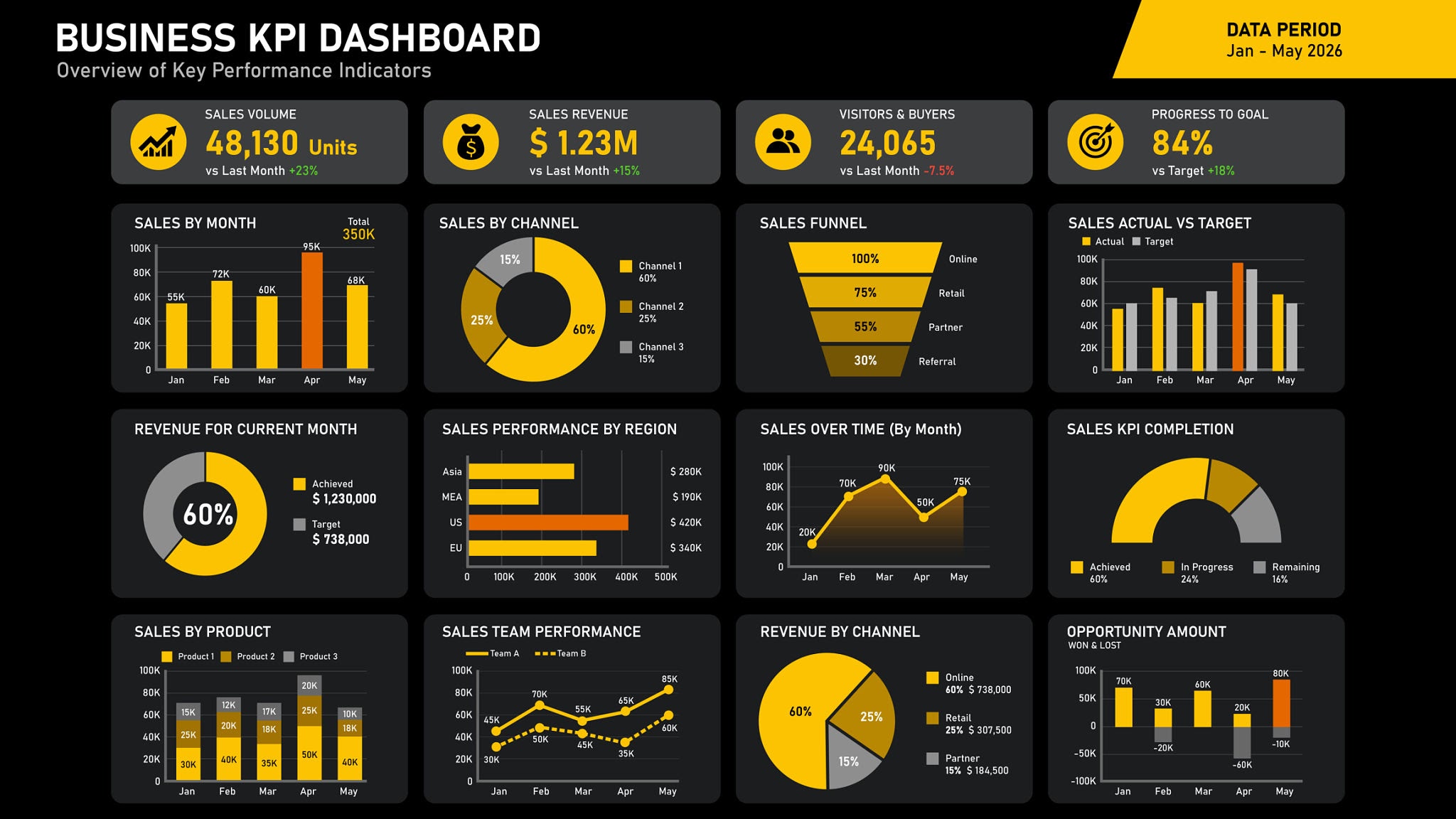
A common mistake scaling sales organizations make is building a single “Master Sales Dashboard” for the entire company. Executives end up drowning in micro-level rep activity data, while sales managers lack the granular insights required for weekly 1-on-1 coaching.
To maintain high usability, partition your CRM dashboards into role-based views:
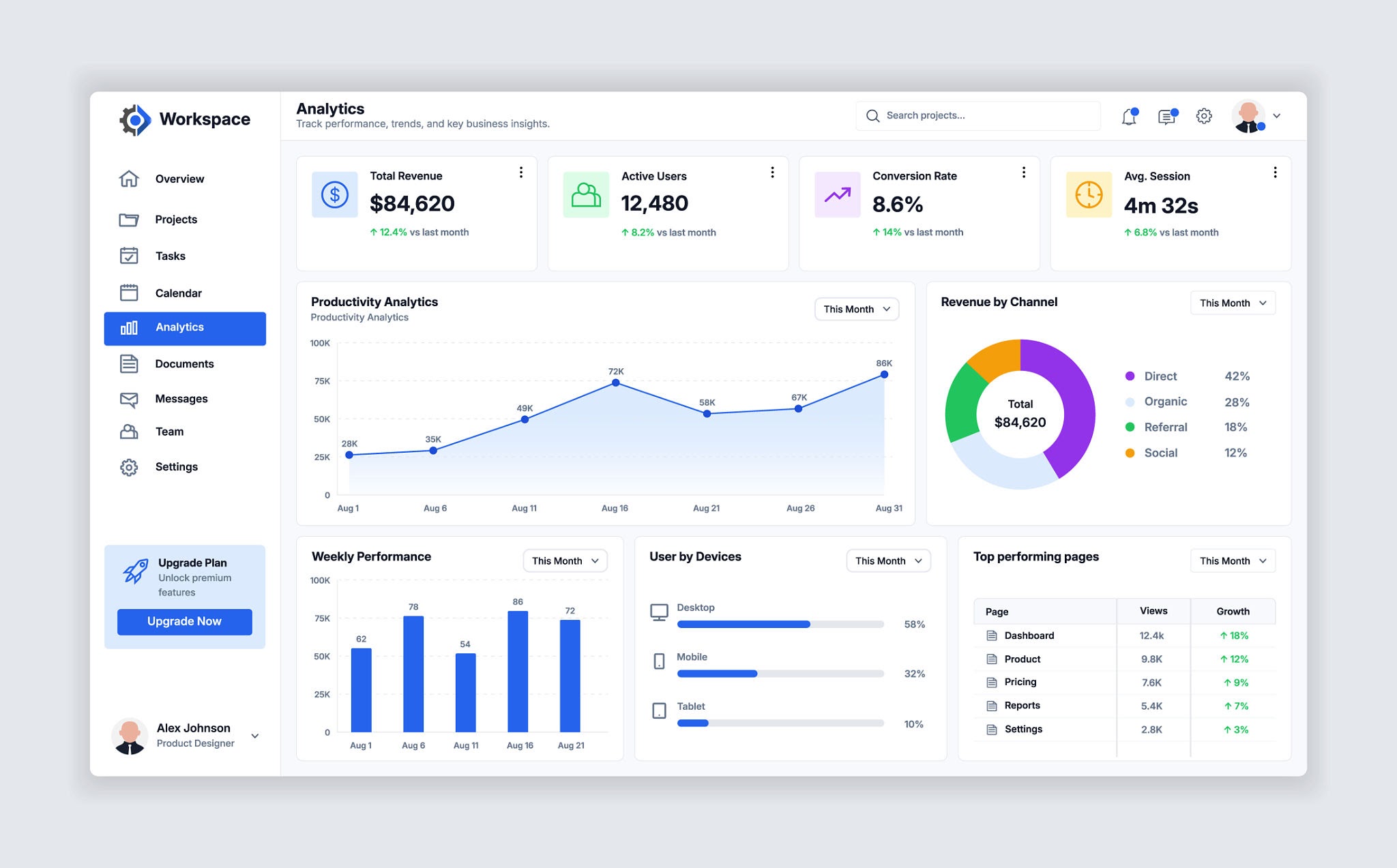
Executive-level pipeline and sales analytics dashboard setup. Source: Adi Wirawan / Getty Images
Role-Based Dashboard Architecture:
Executive / Board View: High-level strategic health metrics—Total Weighted Pipeline, Forecasted Revenue vs. Quota, Average Sales Cycle Length, and Customer Acquisition Cost (CAC) Ratio.
Sales Leadership & Manager View: Operational execution metrics—Pipeline Velocity, Win/Loss Rate by Competitor, Rep Activity-to-Deal Ratio, and Stale Deal Escalations.
Account Executive (AE) Individual View: Daily tactical execution—Open Deals by Age, Upcoming Follow-Up Tasks, Overdue Stage Actions, and Personal Quota Progress.
3. Implementing Automated Data Hygiene Safeguards
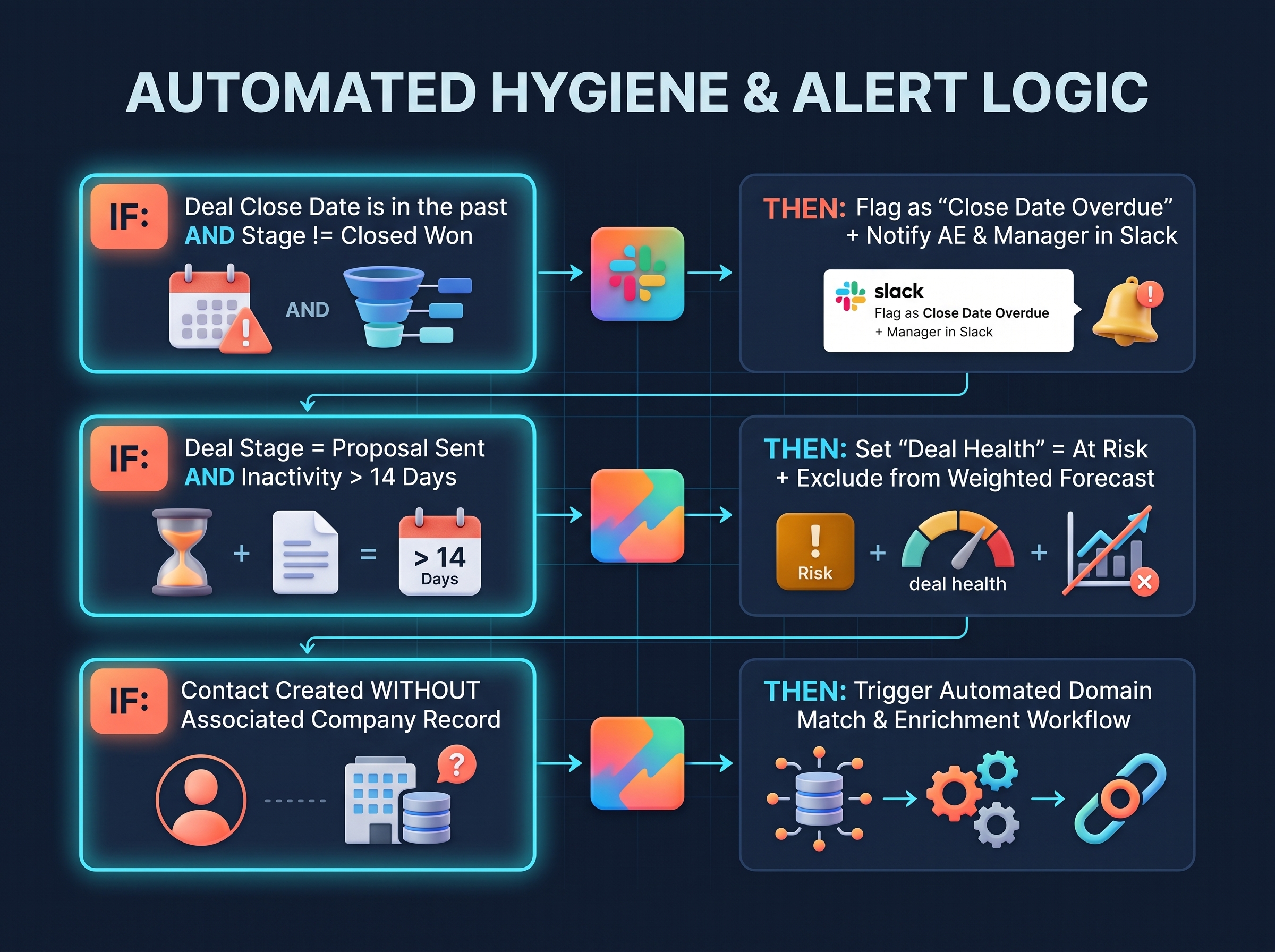
Manual CRM data entry is inherently error-prone. To prevent “garbage in, garbage out” reporting, RevOps teams must deploy automated hygiene rules within their CRM configuration.
Essential Safeguards for Accurate Reporting:
Overdue Close Date Triggers: Automatically flag deals where the close date has passed without a stage update.
Stale Deal Decay Rules: If a deal sits in a pipeline stage past your average cycle duration without logged activity, automatically adjust its forecast weight or flag it for managerial review.
Mandatory Field Rules on Stage Changes: Prevent reps from moving a deal to advanced stages without completing critical qualification properties (e.g., Budget, Authority, Timeline).
4. Key Factors Checklist for Scaling CRM Setup
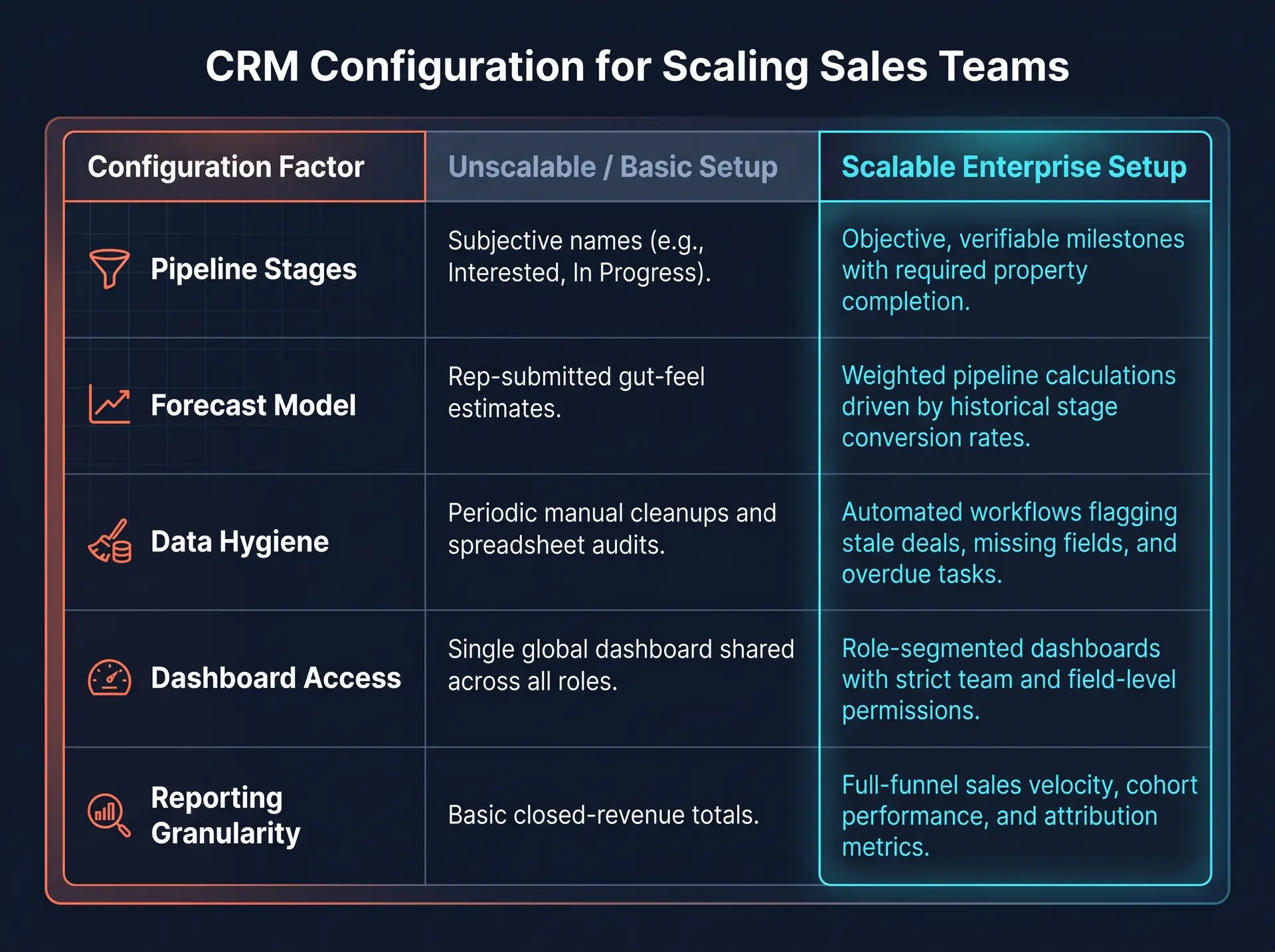
Use this structured comparison matrix when auditing your team’s CRM dashboard readiness for scale:
Frequently Asked Questions (FAQs)
1. Why do sales reps resist CRM data entry, and how does proper configuration fix it?
Rep resistance usually stems from complex, bloated forms containing non-essential fields. Proper CRM configuration streamlines data entry by using progressive disclosure—only displaying required fields when a deal reaches a specific stage—and automating routine logging via email and calendar syncs.
2. How often should scaling SaaS teams audit their CRM dashboard configurations?
A full RevOps audit should be conducted quarterly, or immediately following major shifts in sales strategy—such as launching a new product line, expanding into an enterprise market tier, or restructuring sales territories.
3. What is the difference between unweighted and weighted pipeline reporting?
Unweighted pipeline counts the total value of all active deals regardless of stage. Weighted pipeline multiplies each deal’s value by the historical probability of closing at its current stage (e.g., a $100,000 deal at a 30% stage probability equals $30,000 in weighted pipeline), providing a far more realistic revenue forecast.
4. Should custom objects be used for CRM reporting dashboards?
Yes, when tracking complex B2B business models—such as recurring SaaS subscriptions, consumption-based usage data, or multi-location onboarding contracts. Custom objects allow you to report on business-critical relationships without overloading standard Contact, Company, or Deal records.
Conclusion: Turning CRM Data into a Growth Engine
A well-configured CRM dashboard isn’t just a reporting tool—it is the central compass for your entire sales organization. By standardizing pipeline stages, implementing automated data hygiene safeguards, and building role-specific reporting views, revenue leaders gain the visibility needed to scale predictably.
Enterprise RevOps Strategy Session with CRM Architecture Specialists. Source: PictureXpress / Getty Images
READY TO TRANSFORM YOUR CRM REPORTING & SALES VISIBILITY?
Outgrowing your current dashboard setup? Stop making executive decisions based on incomplete or inaccurate CRM data.
Book a free 30-minute CRM Architecture Audit with our RevOps specialists today. We will evaluate your current pipeline setup, identify reporting gaps, and build a blueprint for clean, reliable sales analytics.