
How Higher Education Admissions CRM Integration Boosts Student Enrollment
University HubSpot Enrollment Integration Guide
Are prospective students slipping through the cracks due to disconnected systems and delayed follow-ups?
Higher education enrollment teams often struggle to manage applicant data across multiple legacy systems. Implementing a seamless higher education admissions CRM integration allows universities to connect higher education databases directly with HubSpot, automating time-consuming admissions workflows and building a unified view of every prospective student.
In this guide, you will learn how to integrate your university’s databases with HubSpot, automate your admissions pipeline, and ensure proper data governance across departments.
Direct Answer Summary: How Do You Connect University Databases to HubSpot?
To integrate a university database with HubSpot for enrollment management:
Define Data Ownership & Mapping: Identify key student fields (e.g., application status, intended major, test scores) across your Student Information System (SIS) and HubSpot.
Choose an Integration Method: Select between custom REST API webhooks, middleware platforms (like Zapier, Make, or Celigo), or native higher education integrations.
Establish Data Governance Rules: Decide which system acts as the primary system of record for each data point to prevent sync conflicts.
Automate Admissions Workflows: Trigger personalized email sequences, SMS alerts, and internal task assignments based on real-time database updates.
Why Higher Education Admissions CRM Integration Matters
Managing student enrollment management across separate databases creates data silos, increases manual data entry, and delays response times to student inquiries.
Integrating your legacy higher education databases with HubSpot delivers several key benefits:
Real-time visibility: Admissions officers can track student touchpoints from initial inquiry through enrollment.
Automated follow-ups: Admissions automation instantly delivers relevant information when a prospective student submits an application or updates their status.
Data consistency: Bidirectional synchronization ensures student records remain accurate across both administrative and marketing databases.
Improved student experience: Personalized messaging based on applicant interest increases engagement and yield rates.
Step-by-Step Blueprint for HubSpot CRM Integration
Integrating your campus technology stack requires clear planning, proper technical execution, and strict governance. Follow this four-step process:
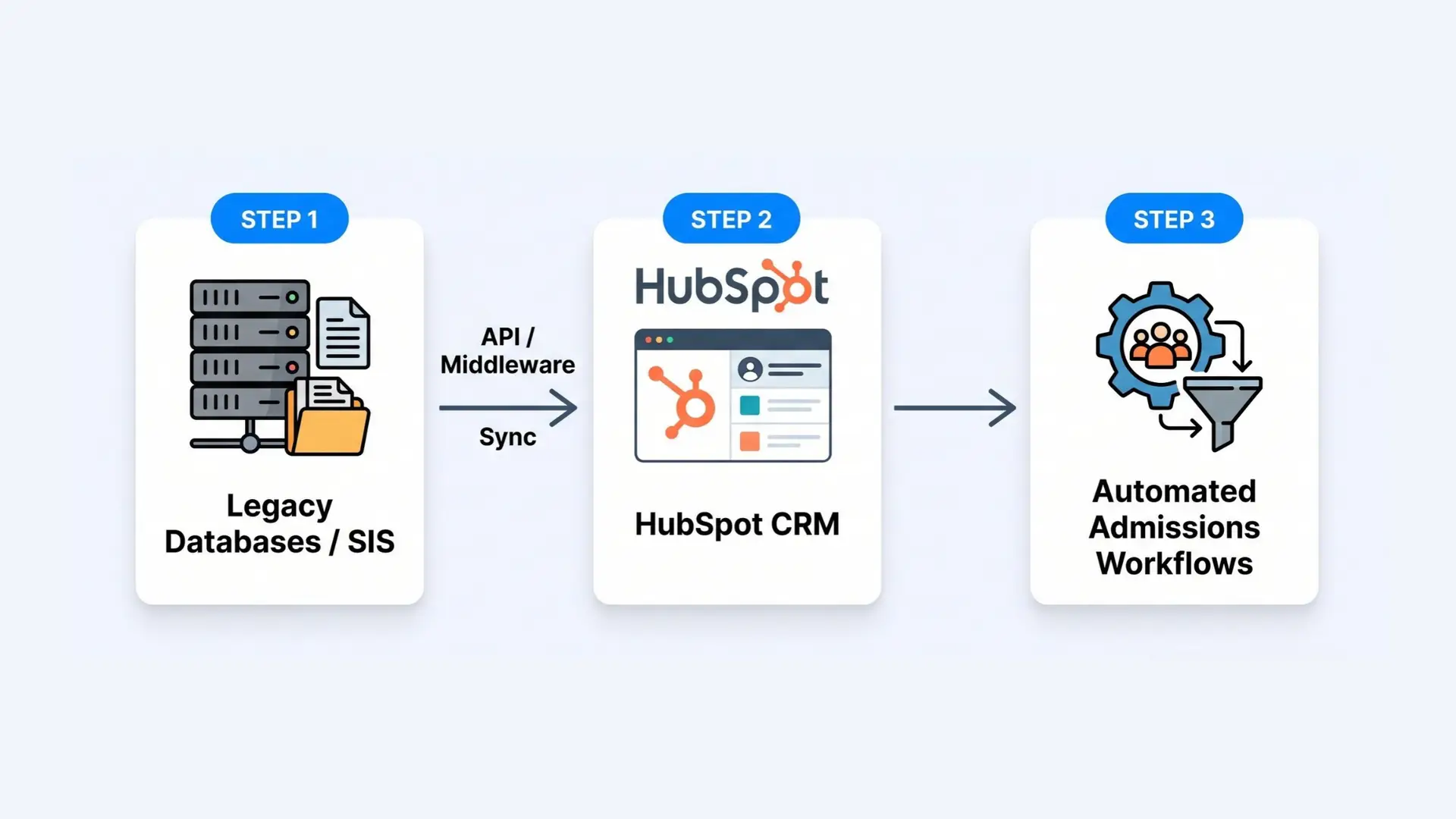
Step 1: Map Your Data Fields
Before writing code or configuring middleware, create a field-mapping matrix between your Student Information System (SIS) / legacy database and HubSpot.
Key data points to map include:
Contact Details: Name, Email, Phone, Address
Academic Information: Intended Major, Entry Term, Target Graduation Year
Application Status: Inquired, Applied, Accepted, Deposited, Enrolled
Step 2: Select the Right Integration Architecture
Depending on your university’s technical infrastructure, select one of three main connection methods:
Custom API Integration: Build direct API connectors using HubSpot’s REST APIs for maximum customizability and real-time data sync.
Middleware Integration Tools: Utilize enterprise iPaaS solutions (like Celigo or MuleSoft) to bridge legacy systems without extensive custom code.
Pre-built Higher Ed Connectors: Leverage specialized software built specifically for university database integrations.
Step 3: Implement Data Governance & Sync Rules
To maintain high data integrity, define clear governance standards:
Determine System of Record: Establish your primary database (e.g., Banner, Colleague, or PeopleSoft) as the source of truth for official enrollment records, while using HubSpot for real-time engagement data.
Sync Direction: Use two-way syncing for contact updates and one-way syncing for administrative milestones.
Error Handling: Set up automated alerts to notify IT administrators if data validation errors occur.
Building High-Converting University Admissions Workflows
Once your HubSpot CRM integration is live, you can leverage university admissions workflows to engage applicants automatically.
Key Admissions Workflows to Build:
Application Nudge Campaign:
Trigger: Prospect starts an application but does not submit within 3 days.
Action: Send a series of helpful emails offering application tips, financial aid information, or an invitation to schedule a call with an admissions counselor.
Instant Acceptance Notification & Next Steps:
Trigger: Database status changes to “Accepted.”
Action: Instantly send an acceptance congratulatory message via email and SMS, along with instructions to submit their enrollment deposit.
Inquiry Route & Task Assignment:
Trigger: A student submits a contact form inquiring about a specific academic program.
Action: Automatically assign the lead to the dedicated regional admissions representative and create a follow-up task.
Frequently Asked Questions
What is higher education admissions CRM integration?
Higher education admissions CRM integration is the process of connecting university databases (such as Student Information Systems or ERPs) with a CRM like HubSpot to synchronize prospective student data, streamline admissions processes, and automate communication.
Can HubSpot connect directly to legacy university databases?
Yes. HubSpot can connect to legacy higher education databases via custom REST API endpoints, webhooks, or enterprise middleware solutions designed for higher education IT environments.
How does admissions automation improve enrollment rates?
Admissions automation speeds up response times to prospect inquiries, delivers personalized communication tailored to the applicant’s interests, and prevents qualified applicants from dropping out during the application process.