
The Hidden Cost of Broken CRM Workflows
When your sales funnel stalls or customer data vanishes into thin air, your CRM is usually the main suspect.
For fast-growing SaaS startups, a CRM shouldn’t just store contacts—it needs to power your entire revenue engine. Yet, over 50% of software implementations fail to deliver their expected ROI because of underlying CRM implementation challenges [Source].
When tech stack setups crumble, reps stop logging data, billing integrations fail, and pipeline visibility disappears.
If your team struggles with messy data, broken integrations, or low adoption, you aren’t alone. This guide breaks down the five most common CRM gaps in SaaS startups and provides step-by-step recovery paths to fix them.
1. Mismatched Technical Setup and Data Schema
SaaS business models rely heavily on unique data points like recurring revenue (MRR), churn risk, product usage tiers, and seat counts. Standard off-the-shelf CRM configurations rarely accommodate these metrics out of the box.
The Gap
Setting up your CRM like a traditional business results in custom object overload, duplicate properties, and unorganized deal stages. Your reps waste hours manually logging information, while executive dashboards display inaccurate data.
The Fix
Map your customer lifecycle first: Define your exact lifecycle stages (e.g., Lead, Product-Qualified Lead, Opportunity, Customer, Expansion) on paper before touching CRM settings.
Standardize custom fields: Limit custom properties to metrics that directly drive sales outreach or retention decisions.
Implement strict input validation: Mandate required fields for deal progression so reps cannot advance opportunities without essential data.
2. Integration Failures Across the Tech Stack
Your SaaS CRM cannot operate in isolation. It needs real-time data from your product analytics tools, billing engines (like Stripe), and customer support desks (like Zendesk).
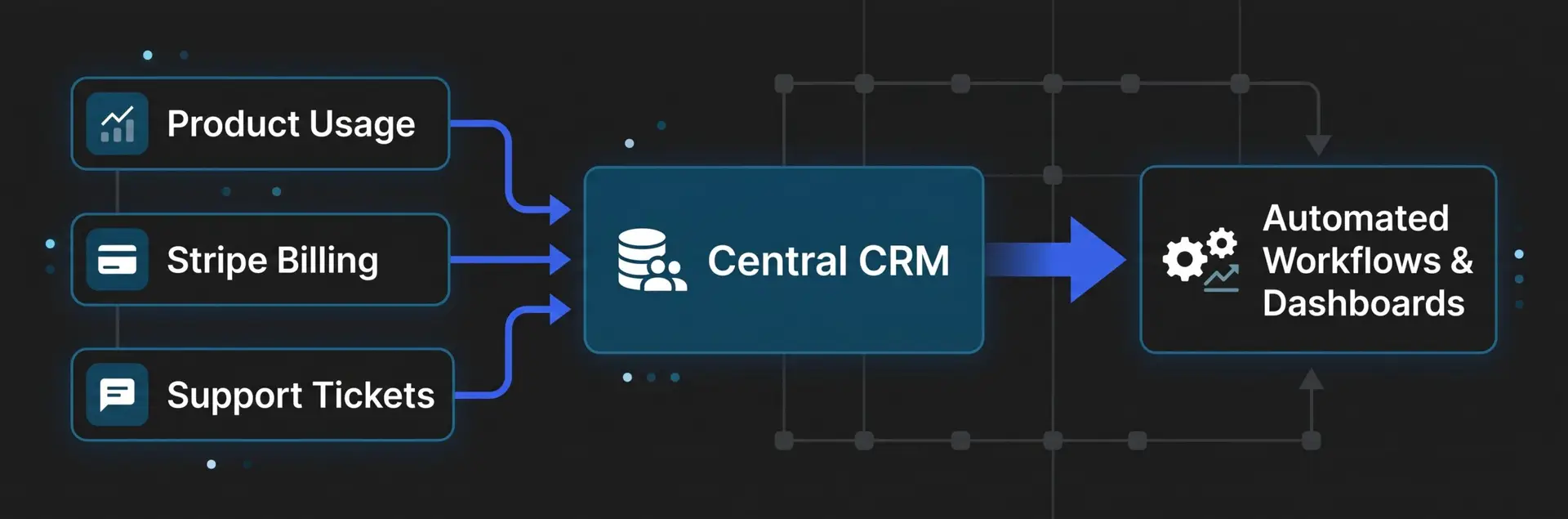
The Gap
When CRM integration issues occur, sales reps stay completely unaware of open support tickets, account managers miss churn signals, and finance teams spend days reconciling ARR metrics.
The Fix
Audit API endpoints and webhooks: Check your integration sync logs weekly to identify failed payloads or rate-limit throttles.
Use middleware for complex routing: If direct native integrations fail, utilize robust automation platforms (like Zapier or Make) to handle multi-step data transformations.
Establish a single source of truth: Decide which platform owns specific data points. For instance, let your billing system own invoice history, while your CRM owns subscription status.
3. Low Team Adoption and Operational Friction
Even the most sophisticated CRM technical setup fails if your account executives and customer success reps refuse to use it.
The Gap
Reps view the CRM as a tedious micromanagement tool rather than an assistant that helps them close deals. They resort to personal spreadsheets, leaving the CRM out of date.
The Fix
Automate repetitive admin tasks: Set up automated deal stage triggers to send follow-up emails, update contact status, and create tasks.
Simplify rep views: Hide unnecessary fields from daily deal screens so reps only see the information they need to close deals.
Tie CRM hygiene to compensation: Make accurate CRM pipelines a explicit requirement for commission payouts and weekly deal reviews.
4. Poor Signal Visibility and Analytics Gaps
Founders and revenue leaders depend on CRM analytics to forecast growth, evaluate acquisition costs, and spot pipeline bottlenecks.
The Gap
Disjointed data pipelines create dashboards filled with vanity metrics instead of actionable revenue insights. You cannot tell which marketing channels generate high-value accounts or where prospects drop out of the sales process.
The Fix
Clean historical data: Audit your database to merge duplicate records, purge inactive contacts, and correct invalid email addresses.
Build role-based dashboards: Create dedicated views for Founders (high-level ARR trends), Sales Managers (pipeline velocity), and CS Leaders (net retention).
Track lead-to-revenue conversion: Configure multi-touch attribution to accurately link closed revenue back to original acquisition sources.
5. Inadequate Platform Support and Resource Constraints
Early-stage startups often lack dedicated CRM administrators or Revenue Operations (RevOps) managers to maintain platform health.
The Gap
When technical glitches arise, teams lack the internal expertise or external CRM platform support to resolve issues quickly. Minor configuration mistakes compound over time into massive operational roadblocks.
The Fix
Document system architecture: Maintain an internal knowledge base detailing your custom properties, workflow triggers, and integration rules.
Leverage vendor support channels: Assign a dedicated internal admin to liaise with your CRM’s priority support team or community forums.
Consider fractional RevOps: Partner with a RevOps consultant or agency to audit and optimize your CRM architecture without hiring a full-time administrator.
Frequently Asked Questions (FAQs)
What are the most common CRM implementation challenges for SaaS startups?
The main challenges include improper custom data modeling for SaaS metrics (like ARR and seats), broken integrations with billing/product analytics, low sales rep adoption due to manual entry, and a lack of dedicated RevOps resources to maintain system health.
How do I improve team adoption of our new CRM?
Simplify rep views by removing unnecessary fields, automate routine task creation and email logging, and clearly demonstrate how using the CRM helps them close deals faster. Making accurate CRM data part of weekly deal reviews and compensation structures also enforces accountability.
Which tools should integrate directly into a SaaS startup’s CRM?
At a minimum, your CRM should integrate with your billing engine (e.g., Stripe) for revenue tracking, your product analytics platform for usage data, customer support software (e.g., Zendesk) for ticket visibility, and your email/calendar platform for communication logs.
How often should a startup audit its CRM data and integrations?
Perform quick weekly checks on integration error logs and webhook syncs. Conduct a full database cleanup and field usage audit quarterly to merge duplicate records, archive dead leads, and deprecate unused custom properties.Lorem ipsum dolor sit amet, consectetur adipiscing elit. Ut elit tellus, luctus nec ullamcorper mattis, pulvinar dapibus leo.