
Complete Guide to HubSpot Breeze AI Routing
In B2B SaaS, revenue slippage rarely happens at the bottom of the funnel. It happens in the handoff. A high-intent lead submits a demo request, sits unassigned for four hours, gets routed to an account executive on PTO, and books a call with your competitor before your team sends a single email.
Traditional lead assignment relies on static round-robins and rigid workflow rules. These systems treat every lead identically—whether it is a Fortune 500 buyer with 5,000 employees or a student downloading an ebook.
HubSpot Breeze AI shifts lead management from static rules to dynamic, real-time qualification and intelligence. By combining automated enrichment, conversational AI agents, and contextual routing logic, revenue operations teams can systematically improve speed-to-lead and build predictable sales forecasts.
Here is how B2B tech teams configure Breeze AI agents, build lead qualification rules, and structure routing logic for maximum pipeline reliability.
1. What is HubSpot Breeze AI Routing?
HubSpot Breeze AI is the intelligence layer embedded directly across the HubSpot Customer Platform. Unlike third-party AI bolt-ons that require complex API syncing, Breeze AI operates natively on your CRM database.
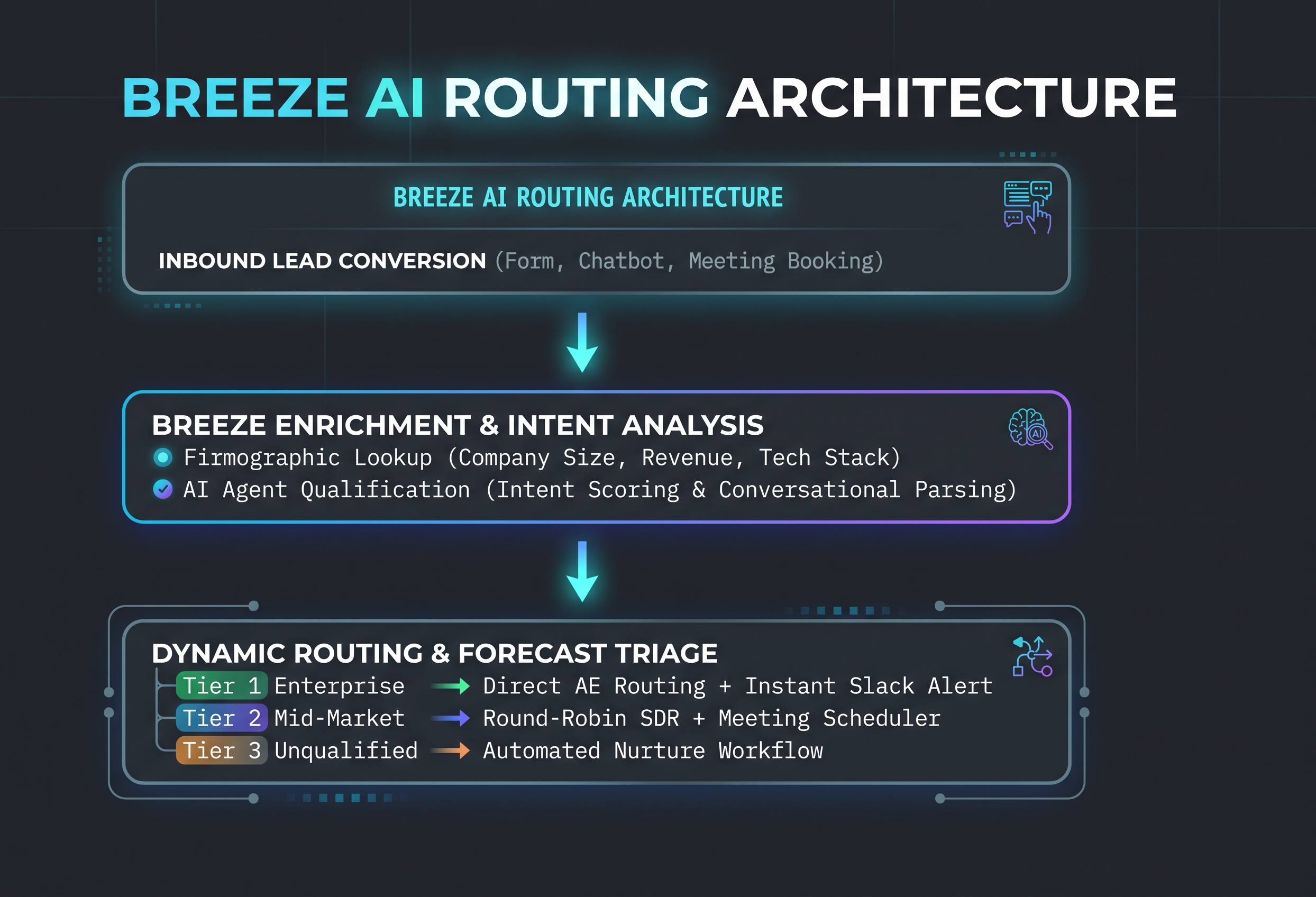
When applied to lead routing, Breeze AI moves past basic IF/THEN workflow statements. It acts as a real-time triage engine that:
Enriches Incoming Records: Pulls firmographic and technographic data the instant a lead converts.
Evaluates Intent & Qualification: AI agents parse buyer intent from conversational inputs, form responses, and behavioral activity.
Executes Contextual Routing: Matches the lead with the best-suited, currently available sales representative based on territory, deal size, expertise, and account ownership.
2. Configuring Breeze AI Agents for Lead Qualification
Before routing a lead, you must qualify them. Breeze AI agents act as the first line of engagement, vetting prospects 24/7 without adding manual overhead.
Step 1: Define Your ICP Parameters in Breeze Intelligence
Breeze Intelligence uses machine learning to match incoming email domains with global company databases. Configure your Ideal Customer Profile (ICP) criteria inside your Breeze portal settings:
Target Firmographics: Employee count, annual revenue, industry, and headquarters location.
Technographic Match: Software tools currently installed on the prospect’s domain.
Buyer Persona Role: Job title keywords and seniority indicators.
Step 2: Deploy the Customer Agent for Automated Qualification
Configure the Breeze Customer Agent on high-intent conversion channels (such as demo pages and pricing calculators):
Set Guardrails: Define strict boundaries on what the AI agent can promise regarding pricing or custom feature availability.
Conversational Lead Scoping: Train the agent to collect three essential qualification variables in real time: Current Pain Point, Implementation Timeline, and Estimated User Seats.
Instant Disqualification Logic: Instruct the agent to gracefully redirect non-ICP visitors (e.g., job seekers, vendors, students) to self-service knowledge base links.
3. Designing Dynamic Routing Logic in HubSpot Workflows
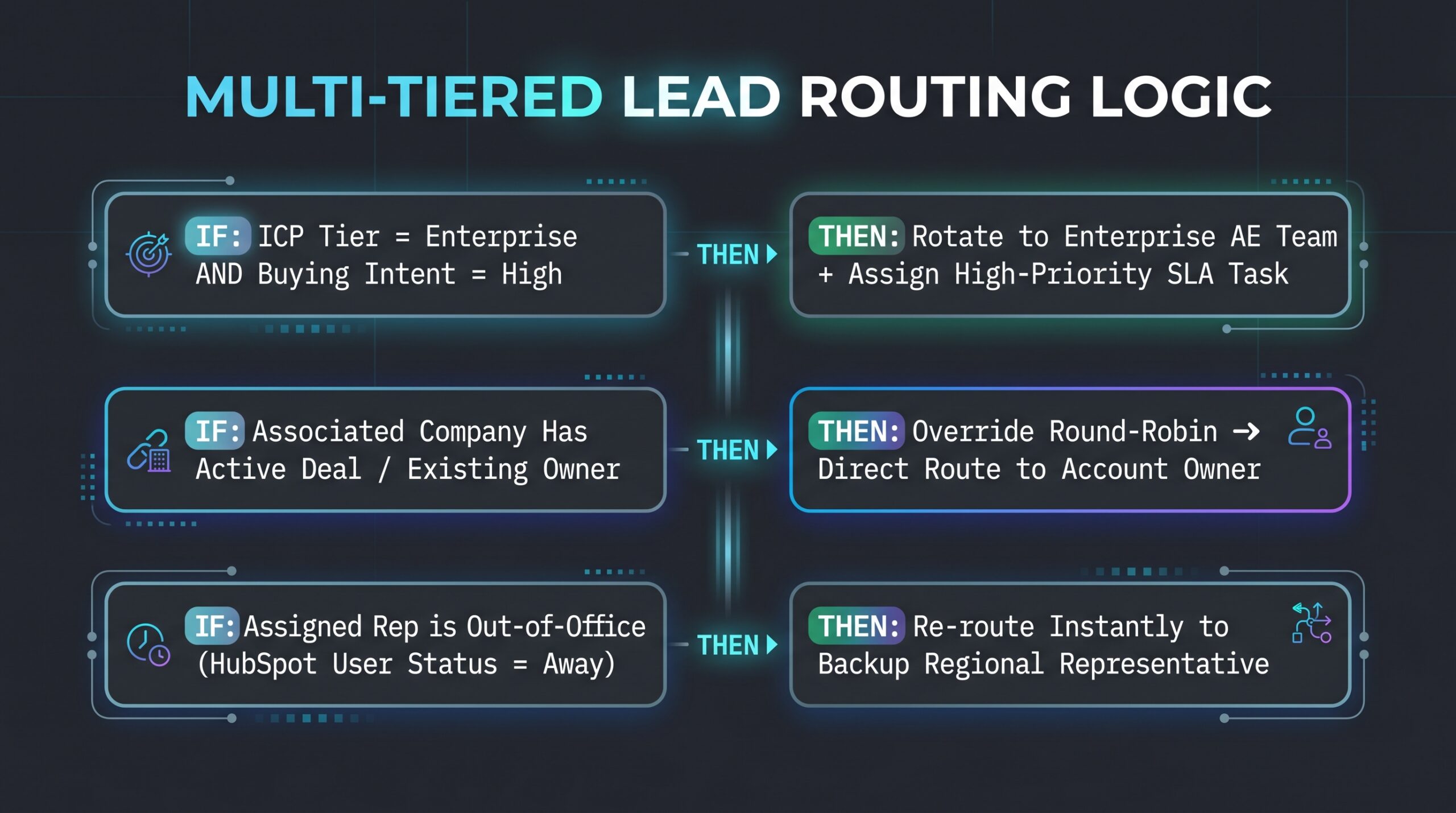
Once Breeze AI scores and qualifies a lead, your routing workflows execute the handoff. To prevent pipeline bottlenecks, build a multi-tiered routing structure inside HubSpot Workflows.
Essential Workflow Configurations:
Account-Based Routing Overrides: Ensure that if an incoming lead belongs to an existing target account or has an active deal, the lead bypasses general round-robins and routes directly to the assigned Account Executive.
Availability-Aware Round Robins: Connect rep calendar status to HubSpot User Availability. If an AE is in a meeting or marked “Out of Office,” Breeze reroutes the lead to the next active rep instantly, maintaining a sub-5-minute speed-to-lead.
Escalation Triggers: Set an automated timer. If an assigned rep does not complete the initial outreach within 15 minutes of routing, trigger a secondary notification to the Sales Manager via Slack or Teams.
4. Connecting AI Routing to Pipeline Forecast Reliability
Messy lead routing ruins sales forecasting. When unvetted leads clog sales pipelines, conversion rates fluctuate wildly, rep velocity metrics become inaccurate, and revenue forecasts miss the mark.
How Breeze AI Improves Forecast Accuracy:
Standardized Opportunity Creation: By allowing Breeze AI agents to enforce strict BANT/MEDDPICC qualification criteria before creating a deal, you ensure that only genuine opportunities hit your pipeline stages.
Clean Stage Velocity Metrics: Automated routing removes manual delay variables from stage duration tracking. Revenue leaders gain an accurate baseline for how long a qualified lead takes to move from MQL to Closed-Won.
Predictive Pipeline Health: Because incoming records are enriched and categorized uniformly, HubSpot’s predictive forecasting models can weigh deal probability accurately based on historical intent profiles.
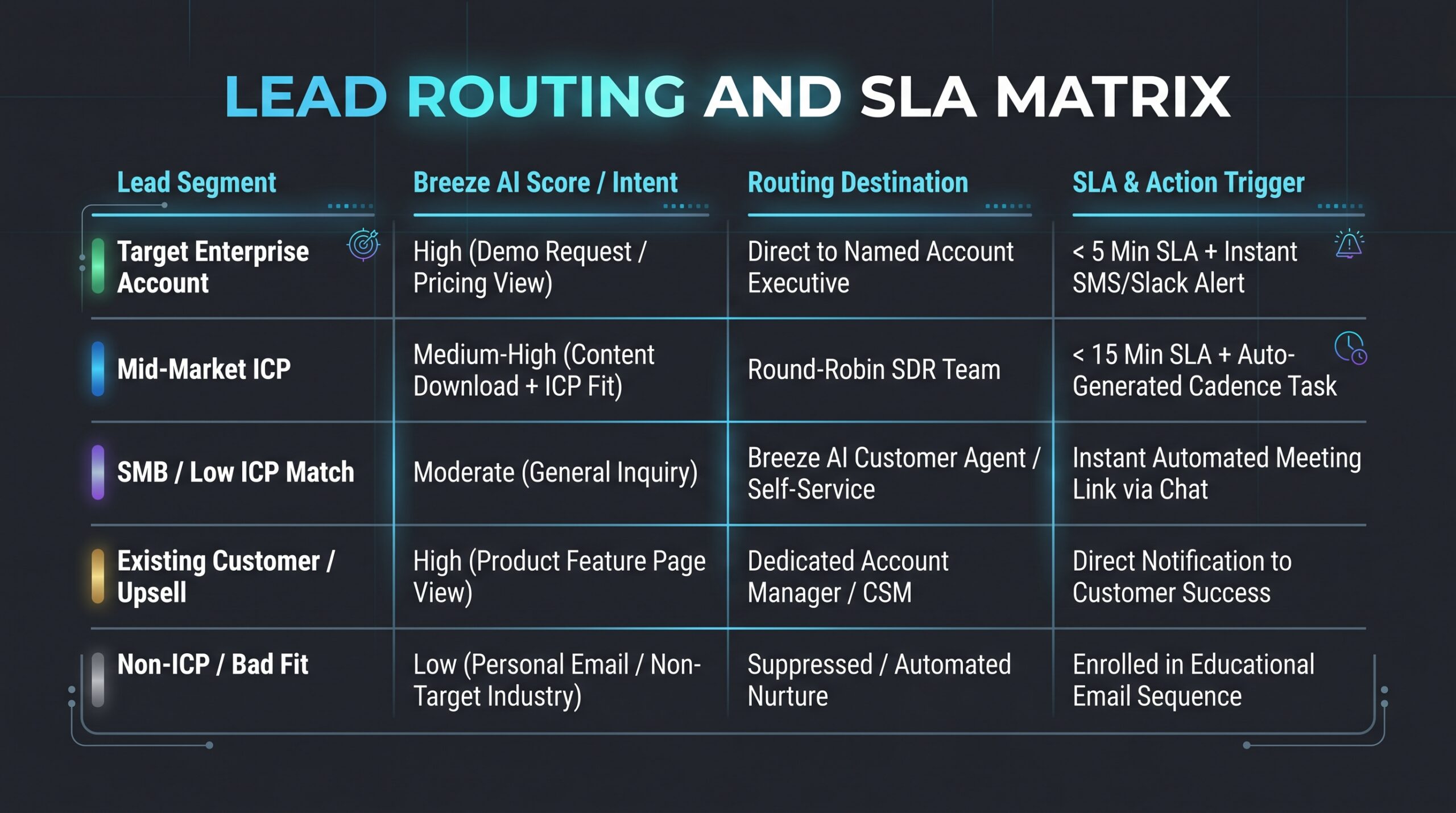
5. B2B Sales & Ops Blueprint: Lead Routing Matrix
Use this reference matrix when building out your Breeze AI routing rules inside HubSpot:
Conclusion: Turning Handoffs into Revenue
Automation without intelligence creates chaos at scale. By configuring HubSpot Breeze AI to handle real-time lead enrichment, conversational qualification, and contextual routing, RevOps leaders eliminate the friction between marketing conversion and sales execution.
The result is a clean pipeline, zero wasted rep activity, and a forecast you can confidently take to your board
Frequently Asked Questions (FAQs)
1. Does HubSpot Breeze AI require an Operations Hub or Enterprise license?
Breeze Intelligence features and advanced AI capabilities are accessible across HubSpot’s Professional and Enterprise tiers, with specific enrichment credit limits determined by your subscription level. For advanced, custom-coded workflow actions and multi-tiered workflow branching, Automation / Operations Hub Professional or Enterprise is recommended.
2. How does Breeze AI handle missing firmographic data for new email domains?
If a conversion uses a personal email domain (e.g., Gmail or Yahoo) or a domain not yet indexed in global databases, Breeze AI flags the record as “Unenriched.” You can configure a fallback workflow rule that routes these leads to an interactive AI Customer Agent for conversational qualification before assigning them to a rep.
3. Can Breeze AI routing override existing account ownership rules?
Yes. You can configure account-based override rules in your routing workflows. If an incoming contact belongs to an existing target account or has an active open deal, Breeze AI will bypass general round-robin pools and assign the record directly to the existing Account Executive or Account Manager.
4. How does Breeze AI account for sales rep availability and time zones?
HubSpot’s availability-aware routing checks the rep’s native calendar status and HubSpot “User Availability” toggle in real time. If an assigned rep is out of office or in a meeting, the workflow automatically re-routes the lead to the next available rep in that territory to maintain your sub-5-minute SLA.